PHP2Shell — “It Won’t Work in the Real World”? It Worked on Our Server
ZIEN Research’s hands-on PHP2Shell analysis, with a check and response guide for web server operators
- 01 PHP2Shell — “It Won’t Work in the Real World”? It Worked on Our ServerNow reading
Contents
- 101 A problem nobody solved
- 202 The bottom line: it worked
- 303 php2shell is not a single bug
- 404 The real danger is “when the request ends”
- 505 The moment, seen in a debugger
- 606 The same 8.3.35 is not the same 8.3.35
- 707 Four common misconceptions
- 808 Is my server okay?
- 909 Response
- 1010 Check for signs of compromise first
- 1111 Coming up next
- 1212 Summary
01 A problem nobody solved
When php2shell hit PHP last month, the mood settled almost immediately after the announcement: “It’s serious, but hard to weaponize in practice.” CrowdStrike said it had not observed a fully weaponized exploit and judged the likelihood of large-scale attacks in the near term to be low, and for a while no usable public exploit was circulating.
Meanwhile, this very vulnerability showed up as a challenge at this year’s HITCON CTF. The setup was nasty.
- Three instances — two Nginx + PHP-FPM, one Apache
- WordPress running on top of all of them
- PHP versions randomly mixed between 7.x and 8.x
It was set up so you could not know which build you would hit. The challenge author (@brokenpacifist) described the intent roughly like this (paraphrased):
“‘Hard to exploit’ and ‘actually not exploitable’ are different things. Let’s use this challenge to see whether that holds in the real world.”
The result: throughout the competition, nobody solved it.
That was exactly what we wanted to know too. Does it really not work in practice? So we set up the environment on servers we own and went all the way, from leaking memory to executing commands. (For the record, we had already succeeded with the full exploit chain on October 22, before HITCON.)
02 The bottom line: it worked
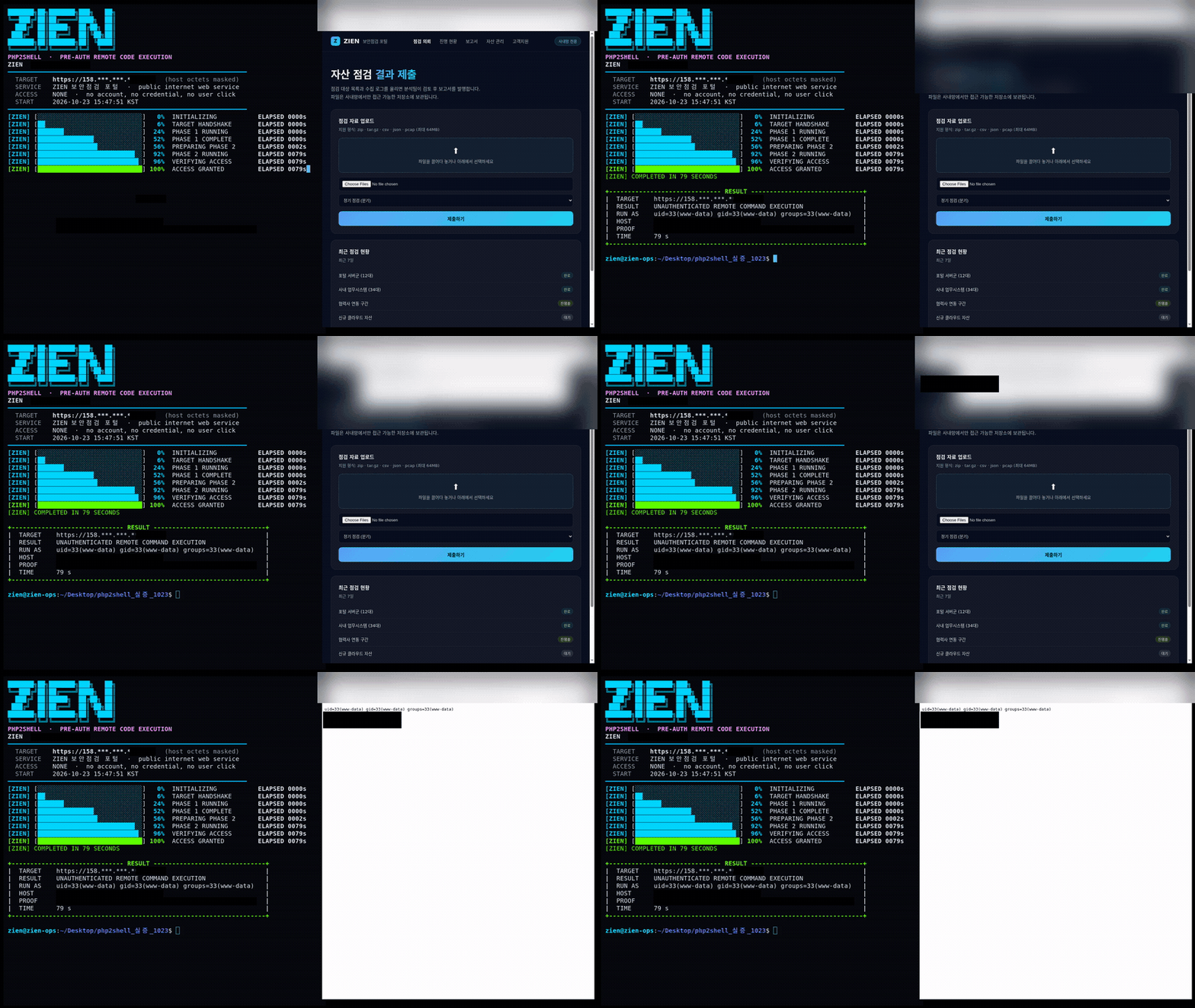
No account, no login, no user clicking anything. Just a few HTTPS requests to a public IP were enough to execute commands on our server with www-data privileges.
The screen above is that moment. In the terminal on the left, leak → address calculation → launch run in sequence, and when it finishes, the browser on the right opens the result file over HTTPS and shows uid=33(www-data) as is. Rather than just saying “it works,” we chose to show it on screen.
One thing needs to be clear first. This post contains no working exploit code, no payload structure, and no memory offset values. Its purpose is to show that this is a threat that really works, not to be followed step by step. All testing was done only on servers we own and control.
03 php2shell is not a single bug
It is called php2shell as if it were one thing, but in reality it is two different bugs in the PHP core. For both, the PHP project announced the possibility of remote code execution.
CVE-2026-109618 — When a request hits the memory limit and exits abnormally, request data that is not yet complete can be carried into the shutdown stage as is. Put simply, PHP tries to clean up a half-built state as if it were valid data.
CVE-2026-109619 — State used by one request can remain in worker (process) globals, and the next request handled by the same worker can pick it up before normal initialization.
Taken separately, each is just “a somewhat odd state.” Put them together and the story changes. The earlier request leaves garbage in memory, and the later request mistakes that garbage for valid data and uses it. From the attacker’s point of view, this means both the shape of the garbage left behind and the timing of when it is used can be controlled with HTTP requests alone. No login and no file upload permission are needed.
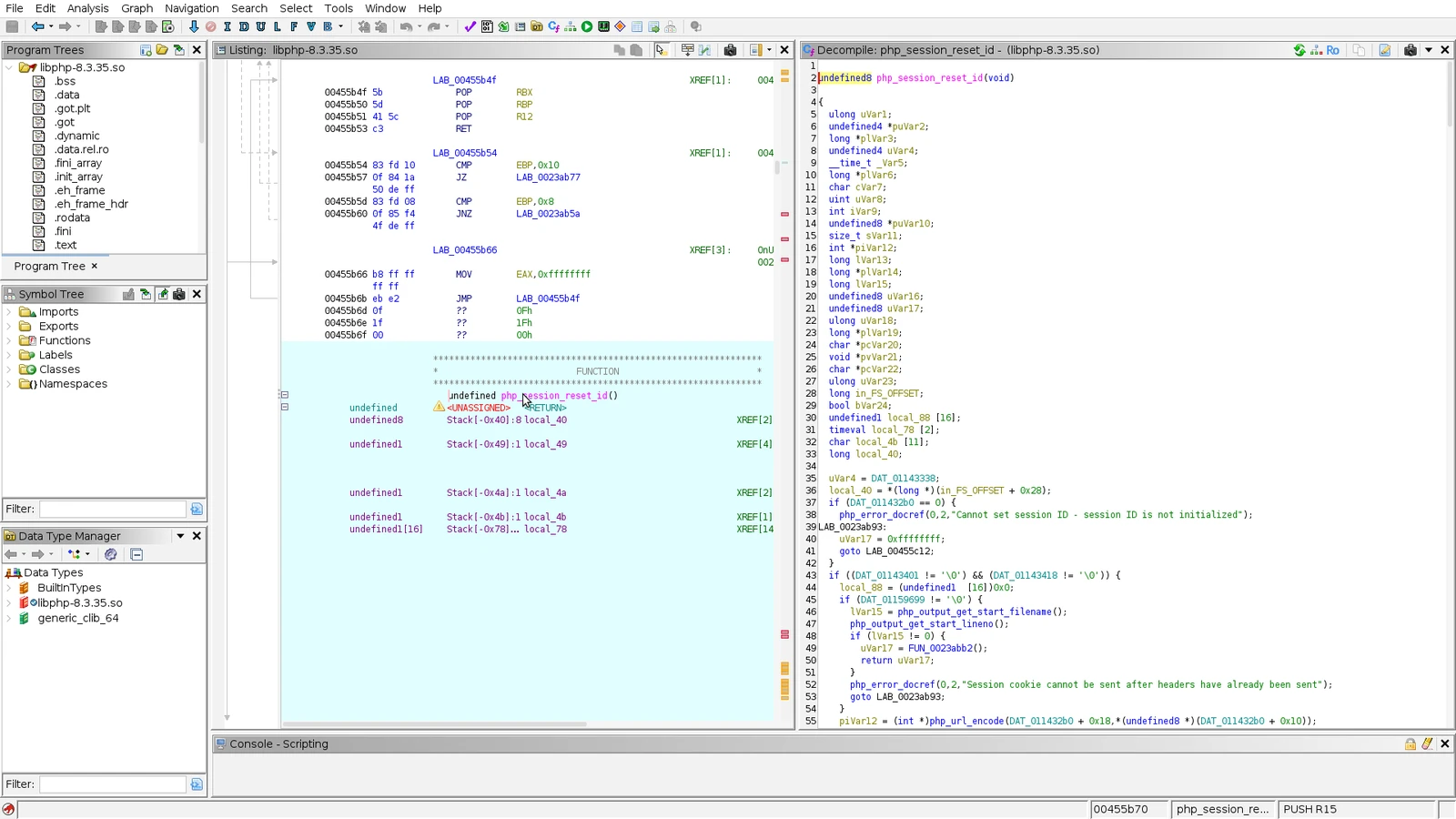
The point in a vulnerable build where the session upload progress callback is invoked. At this early stage there is no code that initializes the session globals. The fixed version adds initialization exactly here — looking at the patch diff makes the nature of this bug clear.
04 The real danger is “when the request ends”
When people think of web vulnerabilities, many picture the time while a request is being processed. In php2shell, though, the decisive moment is when the request ends.
When a request finishes, PHP cleans up the data structures it used. To clean up an array, it reads a function pointer from a structure that says “how to dispose of this array” and calls it directly. Normally, of course, that slot holds PHP’s internal cleanup function.
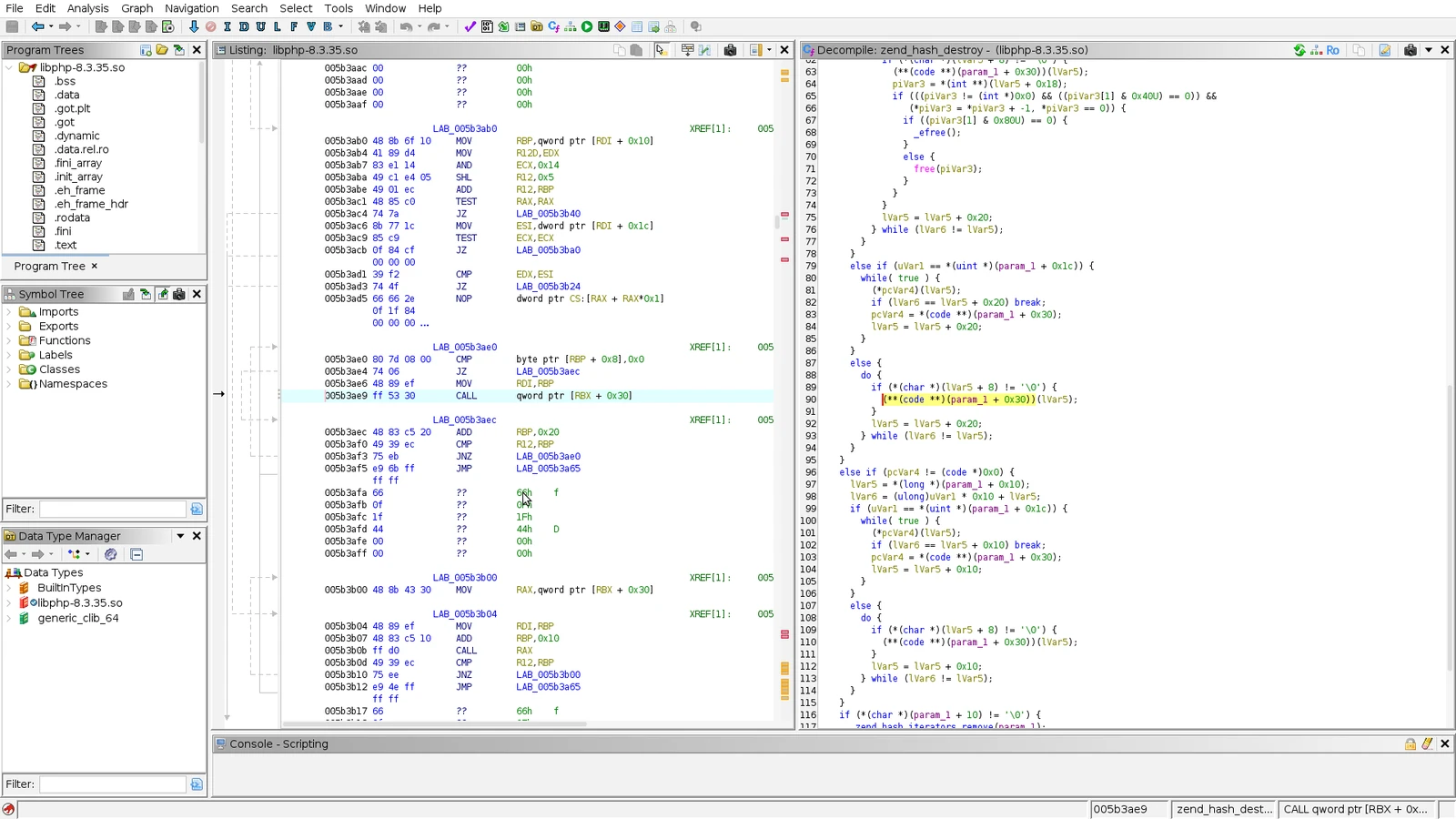
CALL qword ptr [RBX + 0x30] — a single machine instruction that calls the function pointer read from the structure as is. In a decompiler it appears as (**(code **)(param_1 + 0x30))(...).What happens if the two bugs above can be used to tamper with what is in that slot? Instead of the cleanup function, a different function gets called. And PHP happens to have built-in functions for executing commands.
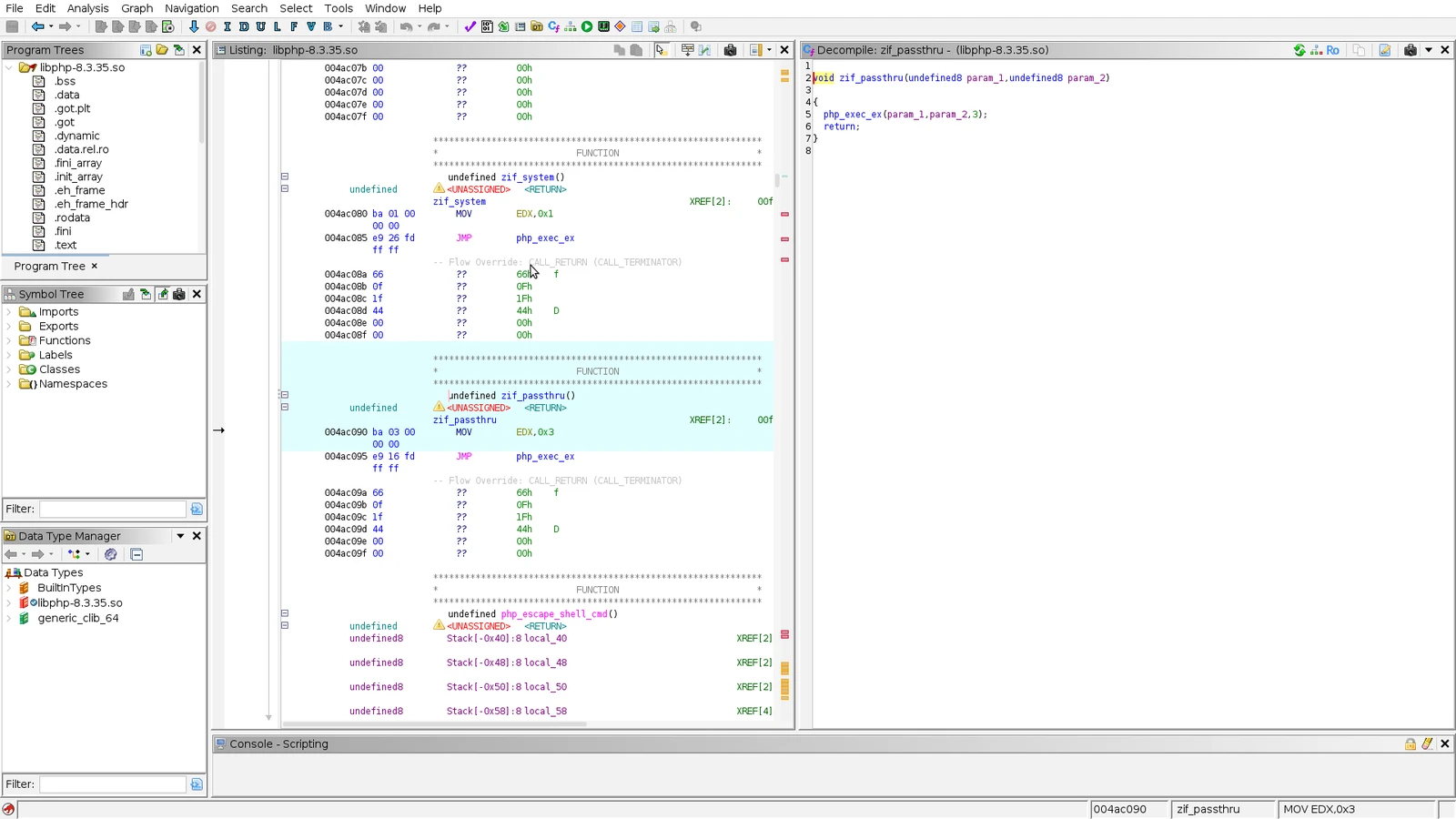
One of PHP’s built-in command execution functions. As soon as it is entered, it sets up one of the arguments it needs by itself and moves on to the execution routine. From the attacker’s point of view, it is a target that is “already half prepared.”
To sum up: deliberately blow the memory limit while a request is being processed to corrupt the state, make the next request pick up that corrupted state, and at the moment the request ends, have whatever was placed in the cleanup function’s slot run instead. All of it is done with ordinary HTTP requests.
05 The moment, seen in a debugger
A conceptual explanation alone does not answer “does it really happen that way?” So we attached a debugger and looked for ourselves.
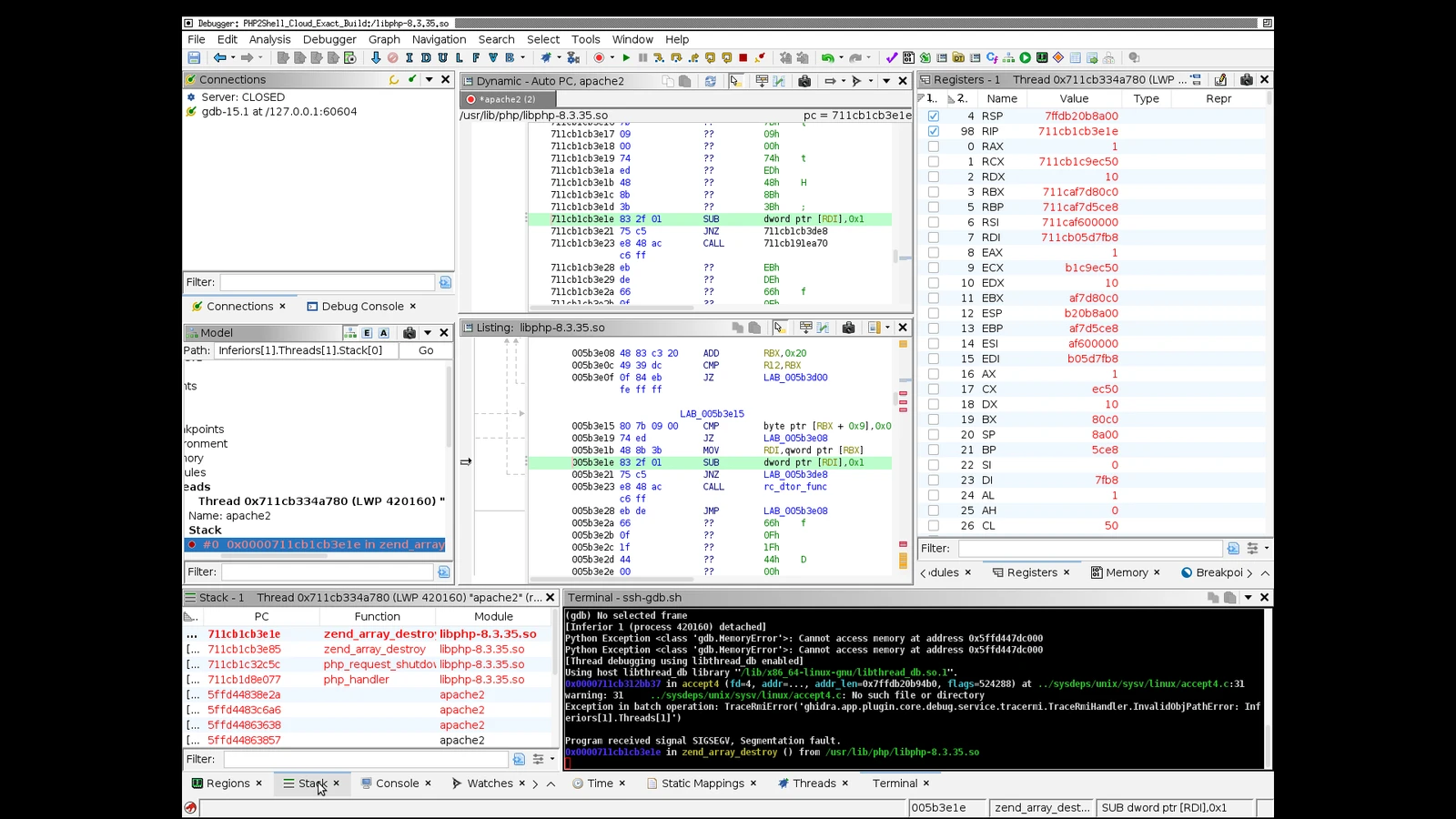
A SIGSEGV in the request shutdown cleanup path. The call stack reads clearly as
zend_array_destroy → php_request_shutdown → php_handler → apache2. In other words, while cleaning up an array as the request ended, it touched a manipulated pointer. And the values in the registers match the values we calculated and sent over HTTP — meaning the data the attacker sends reaches the actual CPU registers intact.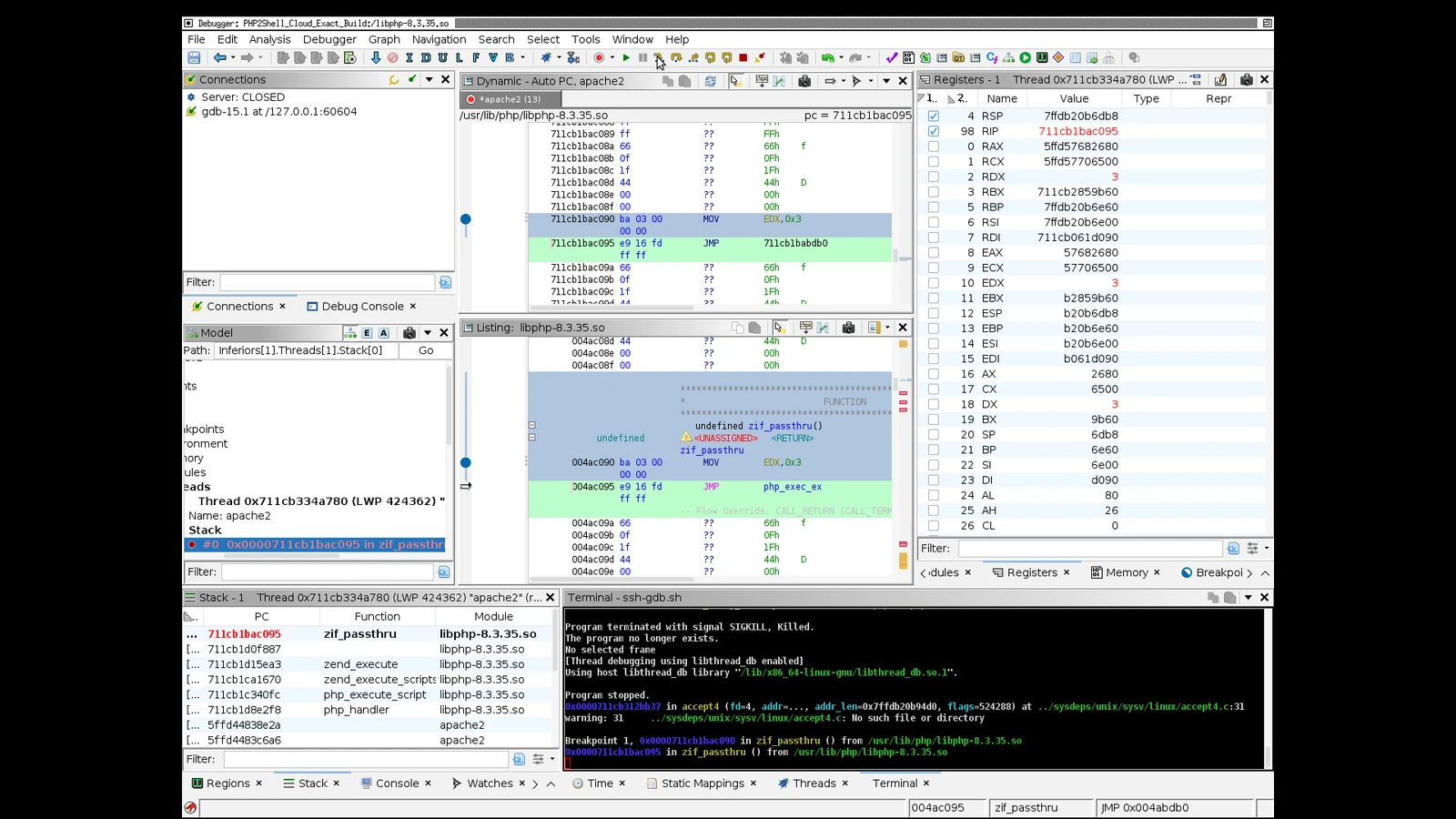
The control group. This is what it looks like when ordinary PHP code calls a command execution function normally. The same function and the same preparation steps observed in the attack path appear here — a baseline that confirms where the vulnerability was trying to reach.
We need to be honest about something here. The crash screen above captures a failed attempt, not a “successful” run. Attaching a debugger changes the process timing and the success rate drops sharply. The runs that actually achieved command execution had no debugger attached, so we do not have “the registers of the exact request that succeeded.”
Even so, this screen says quite a lot. The values we calculated and sent over HTTP really do reach the CPU registers on the request shutdown path, and that point is exactly the spot we had identified in advance through static analysis. Successful runs were confirmed separately by independently retrieving the result file and comparing its hash.
06 The same 8.3.35 is not the same 8.3.35
The most important practical finding from this work is something else.
We analyzed three PHP modules carrying the same version string. One was the distribution package actually running on a cloud server; the other two we built from source ourselves (vulnerable / fixed).
| Module | SHA-256 prefix | Source | Internal function layout |
|---|---|---|---|
| Cloud production module | ea069762… | Distribution package | Baseline |
| Self-built (vulnerable) | 4545188f… | Compiled from source | Different |
| Self-built (fix applied) | b791924f… | Compiled from source | Different again |
All three modules report the same PHP/8.3.35 in the HTTP response header. Yet the positions of the internal functions were different in every one. (We are not publishing the specific values.)
Two things follow from this.
One. It explains why HITCON randomly mixed PHP versions. You cannot tell from the version string what the binary inside looks like. Even if an attacker has everything prepared for one particular build, it will not work as is against a different build. That also means mass attacks that indiscriminately sweep any server are not simple.
Two, and this one matters far more. For defenders, the version string is not a reliable basis. Distributions often keep the version number as is and backport only the security patch. Conversely, the number may have gone up while the module actually loaded is the old one. Checks must always be based on the module the web service is actually loading right now.
07 Four common misconceptions
Before moving on to how to check, here are the reactions we hear most often from customers.
“We use HTTPS.”
Irrelevant. Our demonstration was done entirely over HTTPS. TLS only encrypts the network segment; this bug fires at the stage where the PHP engine processes the request after decryption. Far from stopping the attack, HTTPS keeps intermediate devices from inspecting the traffic and makes detection harder.
“We have a WAF in front.”
It helps, but it is not a shield. The input for this attack is an ordinary multipart POST request that does not look very different from a normal upload. Signature-based blocking is bypassed by changing the request only slightly.
“We updated WordPress (or our framework) to the latest version.”
Irrelevant. The bug is not in the application but in the PHP runtime itself. No matter how up to date the app is, if the PHP underneath is vulnerable, nothing changes.
“php -v says it’s the latest.”
That is the CLI binary. The module the web service actually loads is often a different file. Always check from the web side.
08 Is my server okay?
Affected versions
| Branch | Affected versions | Fixed version |
|---|---|---|
| 8.5 | 8.5.0 – 8.5.11 | 8.5.12 |
| 8.4 | 8.4.26 and earlier | 8.4.27 |
| 8.3 | 8.3.35 and earlier | 8.3.36 |
| 8.2 | 8.2.34 and earlier | 8.2.35 |
| 8.1 and earlier | All versions | No official fix (end of life) |
PHP 8.1 and earlier have already reached end of life, so no official patch will be released. Upgrade to a newer branch, or check whether your distribution provides its own backport.
⚠️ Do not judge by the version number alone. Distributions frequently backport only the security fix while leaving the version string unchanged. As shown above, binaries that carry the same
8.3.35string but differ internally really do exist. The basis for judgment is the module the web server is loading right now.
Risk by configuration
| Configuration | Risk | Notes |
|---|---|---|
| Apache + mod_php (prefork) | 🔴 Highest | Workers carry state between requests. Our demonstration environment |
| Apache + mod_php (worker/event) | 🟠 High | Harder than prefork, but not blocked |
| PHP-FPM (Nginx/Apache) | 🟡 Affected | The HITCON challenge included FPM instances too. Harder, but not a safe zone |
| FrankenPHP / LSAPI, etc. | ❓ Not verified | Outside the scope of this analysis. Follow the official PHP advisory |
| CLI / batch only | ⚪ Not applicable | Not on the web request path |
How to check
# 1) Does the web server use mod_php?
apache2ctl -M 2>/dev/null | grep -i php
# For Nginx, check the FPM side
systemctl status 'php*-fpm' --no-pager 2>/dev/null | head

# 2) The module file the web server actually loads, and its version
#    (with expose_php=Off there is no X-Powered-By header — check by file, as below)
ls -l /usr/lib/apache2/modules/libphp*.so 2>/dev/null
dpkg -l | grep -E 'libapache2-mod-php|php[0-9.]+-fpm'

# 3) Distribution backport (Debian / Ubuntu family)
apt changelog php8.3 2>/dev/null | grep -i "CVE-2026-1096"

# 3-1) RHEL / Rocky / Alma family
rpm -q --changelog php | grep -i "CVE-2026-1096" | head
If you created a temporary page such as info.php to check, delete it right after checking. The page itself is an information disclosure path.
09 Response
Priority 1 — Patch and restart
Upgrade to the fixed version in the table above or later.
sudo apt-get update
sudo apt-get install --only-upgrade php8.3 libapache2-mod-php8.3

# Restarting is not optional
sudo systemctl restart apache2        # mod_php
sudo systemctl restart php8.3-fpm     # also this, for FPM setups
If you skip the restart, the patch is pointless. This vulnerability targets state that workers carry between requests. If the existing workers stay up, the old code keeps running. For containers, rebuild the image and replace them.
Priority 2 — If you cannot patch right away
These settings raise the difficulty of the attack to buy time. They are mitigation, not a fix. The PHP project has also stated that configuration alone cannot fully eliminate the risk.
; Reduce paths where state survives between requests
session.upload_progress.enabled=0
session.upload_progress.cleanup=1

; Make it harder to deliberately exhaust memory
memory_limit= 256M

; Reduce how much input a single request can push in
post_max_size= 8M
max_input_vars=100
max_file_uploads=20
Do not mix up where to apply them. For mod_php it is /etc/php/8.3/apache2/php.ini; for FPM it is /etc/php/8.3/fpm/php.ini or php_admin_value[...] in the pool configuration. We see a lot of cases where someone edits the CLI php.ini and thinks the job is done.
You also need to be clear about the limits. Raising memory_limit only makes it more cumbersome to blow the memory limit; an attacker simply sends a larger request. Conversely, raising the limit indiscriminately creates the risk of an outage from resource exhaustion. Turning off session.upload_progress removes one path where state survives between requests; it does not remove the bug itself. Mitigation is for holding out until you patch.
📌 Check the follow-up notice as well. After the October 21 notice, the PHP project announced a separate issue related to a specific serialization handler condition (CVE-2026-115560). It is outside the scope of this post’s reproduction, so we do not cover it here, but when planning your patch it is safer to check the official PHP announcements once more.
10 Check for signs of compromise first
Patching protects you going forward; whether you have already been hit has to be checked separately. By its nature, this attack leaves traces.
# Memory limit exceeded — a precondition of the attack
grep -c "Allowed memory size" /var/log/apache2/error.log

# Abnormal child process exits — debris from failed attempts
grep -ciE "segmentation fault|exit signal" /var/log/apache2/error.log

# Unusually large POST responses — signs of memory leakage
awk '$6=="POST" && $10 > 1000000' /var/log/apache2/access.log | wc -l

# Files recently created by the web server account — possible web shells
find /var/www -uid 33 -mtime -7 -type f 2>/dev/null | grep -vE '\.sess|cache'
If a server in normal operation shows memory limit errors and child process crashes repeating in the same time window, do not let it slide. If you suspect anything, the right order is to take the service down, preserve the logs and web root in full, and then analyze.
11 Coming up next
And what comes after. We kept researching how tightly this vulnerability is tied to a specific environment (SAPI) and a specific build, and how far that dependency can be reduced, and we succeeded in making it work with as little dependency as possible. To share just one thing: the leak and address calculation stages also held up the same way across different builds.
The question HITCON posed — “Does it work without knowing the version?” — can be answered with a yes as well.
However, we are not publishing those details now. With unpatched servers still everywhere, releasing attack-side details would not be research but harm. That is also why this post contains no reproduction information at all. When things have settled and we judge it is fine to publish, we will write it up properly on the technical side.
Stay tuned.
12 Summary
- php2shell is not a problem with a particular plugin or theme but a bug in the PHP engine itself. Whether it is WordPress, Laravel, or a site you built yourself, and no matter how well the code is written, it is a target if it runs on a vulnerable PHP version.
- It is true that the industry saw it as “hard to weaponize,” and true that nobody solved it at HITCON. But hard did not mean impossible. It worked on our server.
- There is one thing to do. Patch, restart, and check for traces.